
Slack
AICR supports slack_app for one aggregated report per publication and four commands over HTTP or Socket Mode: help, chat-id, review and status. Report destinations and command conversations can be different. Buttons and natural-language requests are outside this implementation.
Create and install
Section titled “Create and install”Choose a receiver first. Both modes require a Bot OAuth token, Bot scopes and channel membership.
| Receiver | Slack console | AICR configuration | Additional credential |
|---|---|---|---|
| HTTP | Disable Socket Mode; set /aicr Request URL |
callback.enabled: true |
Signing Secret |
| Socket Mode | Enable Socket Mode; the command has no Request URL field | callback.enabled: false, socket_mode.enabled: true |
App-Level Token with connections:write |
Open Slack’s app console, then Create New App → From a manifest.
For an existing app, open App Manifest and merge the command and Bot scopes while preserving other settings.
Generate the HTTP manifest from the repository root (use --slack-mode socket below for Socket Mode):
node scripts/register-social-im.mjs --platform slack --callback-url https://aicr.example.org/callbacks/im/botImport the generated manifest object in Slack’s app console. Install the app in the intended workspace and invite its Bot to every command/report channel. Record the app ID, team ID, Bot user ID, Bot OAuth token and signing secret. Set AICR_SLACK_TOKEN and AICR_SLACK_SIGNING_SECRET in the server environment. The callback uses the signing secret; the Bot token is used for outbound API calls.
In the app console’s Socket Mode section, turn off Enable Socket Mode before
setting /aicr’s HTTP Request URL. If the command editor says Socket Mode is enabled,
the URL field is hidden and slash commands are delivered over WebSocket. This
HTTP configuration generates settings.socket_mode_enabled: false. Merge this
setting into the existing manifest and preserve its other fields. Socket Mode
configuration is described below.
settings: socket_mode_enabled: falseSocket Mode is an app-wide setting. Check the app’s existing event and interaction endpoints when switching modes, and preserve other manifest fields. See Socket Mode delivery and console settings.
| Bot scope | Purpose |
|---|---|
chat:write |
Send the review report and terminal reply |
channels:read |
Verify public channel identity, type and membership |
groups:read |
Verify private channels when configured |
commands |
Register and use /aicr |
Only joined public/private channels are supported. DMs, group DMs, threads and Slack Connect tenant expansion are outside this integration. A channel ID prefix is not proof of its type. Slack manifest reference, channel metadata.
Check the scopes above in OAuth & Permissions → Bot Token Scopes, or merge them into
oauth_config.scopes.bot. Identical entries under User Token Scopes do not grant Bot permissions.
After a change, Reinstall to Workspace and update the server’s Bot User OAuth Token.
Run /invite @your-bot in each destination, including private channels.
See OAuth installation and scopes.
| AICR field or variable | Where to find it |
|---|---|
app_id |
Basic Information → App Credentials → App ID |
team_id, bot_user_id |
Call auth.test with the Bot token; use team_id and user_id respectively |
AICR_SLACK_TOKEN |
OAuth & Permissions → Bot User OAuth Token |
AICR_SLACK_SIGNING_SECRET |
Basic Information → App Credentials → Signing Secret, for HTTP |
AICR_SLACK_APP_TOKEN |
Basic Information → App-Level Tokens, for Socket Mode |
Conversation/report channel_id |
Copy the channel ID at the bottom of its details in the Slack client |
| Actor ID for an explicit allowlist | Copy member ID in the person’s profile menu; not the Bot ID |
Inject AICR_SLACK_TOKEN through your deployment environment, then use PowerShell 7 to print only the required IDs:
if (-not $env:AICR_SLACK_TOKEN) { throw 'Set AICR_SLACK_TOKEN first.' }try { $identity = Invoke-RestMethod -Method Post -Uri 'https://slack.com/api/auth.test' -Headers @{ Authorization = 'Bearer ' + $env:AICR_SLACK_TOKEN } -ErrorAction Stop} catch { throw 'Slack auth.test failed; check the token and network locally.' }if (-not $identity.ok) { throw 'Slack rejected auth.test.' }$identity | Select-Object team_id, user_idSet bot_user_id to this user_id, not bot_id or a human member ID.
See the auth.test response fields.
Configure AICR
Section titled “Configure AICR”Merge the YAML below, or sign in to the Dashboard and open Config → IM connections → New im connection.
Select slack_app. This screenshot shows the identity fields of the real local form, using synthetic IDs.
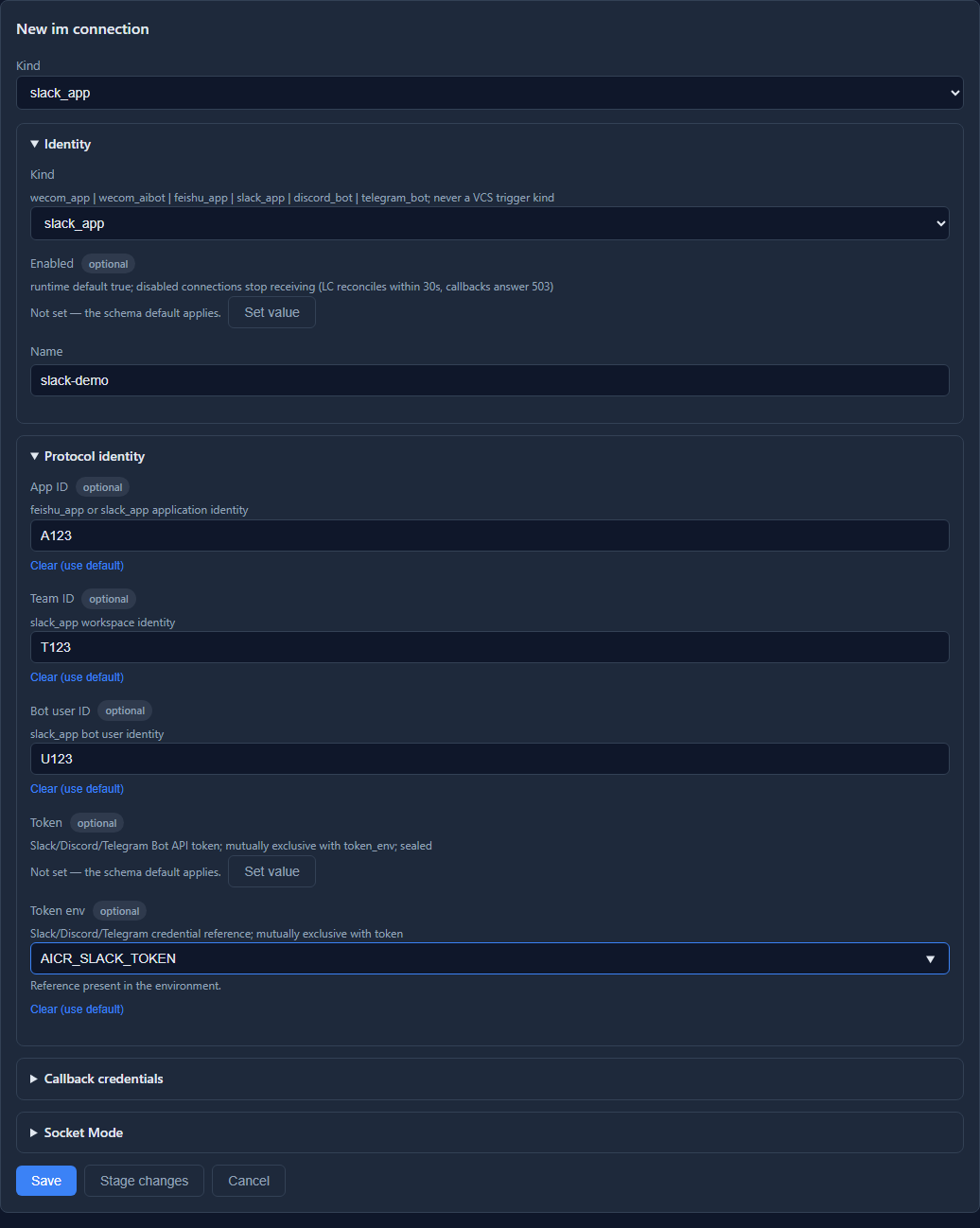
Open the image for full resolution.
The connection name must match the output/binding’s connection and the last HTTP URL segment.
For example, slack-demo uses /callbacks/im/slack-demo; the YAML below uses bot.
Expand Callback credentials or Socket Mode for your chosen receiver, then configure reports and command authorization.
For database configuration, first allow environment references by purpose and destination in the file’s
config_sources.secret_refs. After saving database form changes, verify the active revision and snapshot.
Connection fields explicitly set in the file remain read-only in the UI.
See dynamic configuration and the management UI.
Send reports
Section titled “Send reports”Start from example/slack-app.yaml. Replace every synthetic ID and set its token variable. Keep credentials in im.connections.bot; the output channel references that connection and its exact destination. The example’s ws.outputs.summary: [report] selects the report channel.
File configuration alone can send reports. Merge your existing VCS/LLM configuration before running an actual review. A clean review sends only when the summary has content by default (publish_if_summary). Override no_problems per output policy.
Reports use named, workspace or built-in templates in the normal priority order. Slack/Telegram are bounded to 3900 UTF-16 units including the truncation notice and optional safe report link. Telegram sends text plus explicit entities; Discord permits only host-resolved author mentions; Slack escapes native controls.
When the same review also publishes its full report through an issue channel, AICR sends the issue first and uses its confirmed URL for a brief notification: a headline, problem count, severity/category/location titles and a full-report link. Native author reminders are preserved. Analysis, suggestions and code remain in the issue. Without a usable confirmed URL, including an issue write failure, the channel keeps the full report. Route order does not change this behavior; no new channel option is required.
Reports have Review target, Summary and Problems sections, with each problem label on one line.
Slack uses its own mrkdwn: headings and severity labels become single-asterisk bold text,
and fence language labels are removed while code content is preserved.
CRLF and excess prose spacing are normalized. Internal review markers are hidden outside code examples.
Custom templates retain the priority described above. See Slack’s formatting reference.
Enable commands
Section titled “Enable commands”To select reports for specific repositories with legacy routes, use outputs.routes.rules[].match.repo_ref together with trigger and target_kind. It matches the exact, case-sensitive repository reference. Put these rules before broader rules and keep the existing channel lists when appending the Bot output. A matching legacy route takes precedence over workspace output lists. See configuration fields.
Merge this fragment into the output configuration, preserving the Bot identity/token. Replace its actor, conversation, repository and secret reference with your values. A review requires a persistent SQLite/PostgreSQL store, database configuration source, durable snapshot and running worker. File-only mode rejects it before creating a request. The callback route must be reachable without an admin session; admin APIs still require their normal authentication.
config_sources: database: { enabled: true, backend: storage }storage: database: kind: sqlite sqlite: { path: ./data/aicr.sqlite }triggers: - { name: git, kind: github }workspaces: instances: ws: {}im: connections: bot: kind: slack_app app_id: A123 team_id: T123 bot_user_id: U123 token_env: AICR_SLACK_TOKEN callback: enabled: true signing_secret_env: AICR_SLACK_SIGNING_SECRET command_bindings: reviewers: enabled: true connection: bot actors: [{ type: slack_user_id, id: U234 }] conversations: [{ kind: channel, id: C123 }] commands: [help, chat-id, review, status] repositories: demo: { workspace: ws, source_trigger: git, repo_ref: org/demo } report_policy: workspace_routesThe manifest sets the slash command URL. No command or event subscription is created by server startup. Set this URL to the public HTTPS origin plus any server.path_prefix and /callbacks/im/bot. Slack needs the initial command ACK within three seconds; AICR bounds local admission to one second and returns an ephemeral response.
The connection, actor policy, conversation and repository mapping must all authorize the request.
To allow users in the listed channels without maintaining user IDs, set actors: [{kind: conversation_users}].
This uses the authenticated command sender and channel context. Added users can submit commands without a config change;
leaving a channel does not cancel previously accepted requests. It does not query a member directory.
Private chats cannot use this policy. any, directory scopes, wildcard repositories and extra commands are rejected.
The expires_at field still applies. Merge overlapping bindings; status stays limited to the original request owner.
Use Socket Mode
Section titled “Use Socket Mode”Choose HTTP or Socket Mode. Reports and terminal replies still use the Bot OAuth token.
Create an App-Level Token with connections:write under Basic Information → App-Level Tokens,
and set AICR_SLACK_APP_TOKEN in the service environment. Keep its value out of manifests and source control.
Preserve Bot scopes, channel membership and command bindings, then merge:
im: connections: bot: kind: slack_app app_id: A123 team_id: T123 bot_user_id: U123 token_env: AICR_SLACK_TOKEN callback: enabled: false socket_mode: enabled: true app_token_env: AICR_SLACK_APP_TOKENGenerate the Socket Mode manifest:
node scripts/register-social-im.mjs --platform slack --slack-mode socketThe tool sets settings.socket_mode_enabled: true; the slash command needs no Request URL.
Deploy the receiver, then enable Socket Mode → Enable Socket Mode in Slack’s console.
This app-wide switch also moves events and interactions to WebSocket. The receiver executes
only the four slash commands. Other envelopes are ACKed without handling App Agent events,
mentions or buttons; plan receivers for any existing use of those features separately.
Keep the HTTP URL and signing secret for rollback.
The receiver verifies the hello App ID, command workspace and current authorization before durable admission. It returns an ephemeral ACK with the envelope ID. Deduplication hashes the trigger ID when present, or the envelope ID otherwise. Admission has a one-second budget. Missing readiness or durable runtime withholds ACK and creates no task, allowing platform redelivery. The SDK handles heartbeats; the service retries after 1, 2, 4 seconds up to 30 seconds. Configuration changes rebuild connections within 30 seconds; stale connections immediately reject new commands. Drain closes the connection.
Use one command receiver instance per App. Slack distributes envelopes across multiple connections. Standard HTTP(S) proxy/no_proxy variables apply through an explicit dispatcher to both API and WebSocket traffic. Logs contain connection names and fixed statuses only, without tokens, temporary WebSocket URLs or raw envelopes.
Test /aicr help and /aicr chat-id again after service restart and readiness refresh.
Check the connected status in slack_socket_mode_status; a connection alone does not prove command ACK delivery.
To return to HTTP, disable Socket Mode in Slack, disable socket_mode.enabled, enable the HTTP callback and check its saved Request URL.
See Socket Mode and
Node SDK.
Verify the flow
Section titled “Verify the flow”- From the configured actor and conversation, run
/aicr help, then/aicr chat-id. - Run
/aicr review demo 0123456789abcdef0123456789abcdef01234567using a real fixed commit in your synthetic repository. Git revisions require 7–64 hex characters; configured P4/SVN use fixed positive numeric revisions. - Save the returned request ID and run
/aicr status <request-id>. - Confirm the full report appears only in the configured output destination. The source conversation receives only request ID/state/query instructions. Status is limited to the same actor, connection, conversation and authorized repository.
An ACK means admission, not completed analysis. Readiness is checked from platform identity and configured destination metadata, cached for 300 seconds; an unavailable destination rejects admission. The callback does not wait for VCS, models, readiness network calls or message sends. Background checks refresh before expiry. Pending reads retain the existing cache deadline; success renews it and failure immediately invalidates the destination. Verify command replies across a refresh cycle.
Operations and troubleshooting
Section titled “Operations and troubleshooting”If a command has no reply, type /aicr in the configured channel’s main composer,
select this app from the slash menu, then enter help. The reply is visible only
to the caller. Threads, the App Agent split view and ordinary @Bot messages do
not invoke this integration. Under Features → Slash Commands, check /aicr’s
Request URL. The commands scope and installation also require a command
definition. In HTTP mode, disable Enable Socket Mode if the URL field is hidden.
In Socket Mode, a hidden URL field is expected; check the App-Level Token, connection status and ACK.
Another app can own the same command name. Merge
features.slash_commands into an existing App Agent manifest, preserving its
other fields. See command creation, invocation and name collisions.
If saving the URL reports Your URL didn't respond with the value of the challenge parameter,
this is Event Subscriptions verifying an Events API endpoint. AICR handles
Slash Commands form requests and does not handle that JSON challenge. Open
Features → Slash Commands → Create New Command, set Command to /aicr, enter
the callback address in that command’s Request URL, and save. Edit the command
if /aicr already exists. Preserve an existing App Agent event endpoint; this
integration requires no new event subscription. See Events API URL verification.
Keep the client’s original error, command time and callback HTTP status.
operation_timeout means Slack did not receive an ACK within three seconds.
A successfully admitted valid command leaves an im_inbox row. A missing row can
also mean rejection during authentication, readiness or authorization; it does
not prove that no request arrived. Initial help and chat-id replies return
in the HTTP response or Socket envelope ACK. Check the response and its client display rather
than terminal reply outbox rows. Log only required metadata; exclude tokens,
signatures, response_url and complete request bodies.
A 401 callback response usually means the signing secret, raw body or timestamp is wrong; allow a maximum five-minute clock skew. A 503 means readiness or durable review execution is unavailable. For not_in_channel or private-channel failures, check Bot membership and groups:read. Slack internal_error/fatal_error can represent an ambiguous write and remain unknown. Signature contract, message errors.
Before each new VCS/analysis/publication operation, current authorization is rechecked while execution content retains the admitted configuration snapshot. Disable the binding, connection or active receiver to stop new authorized work. Rotate the Bot token or callback secret through the normal configuration publish process; keep app/team/guild/Bot identities stable. Changing an identity prevents old notifications from being sent through the replacement connection.
delivered requires a complete matching platform receipt. An explicit rejection is recorded as rejected; after POST starts, only a documented 429 authorizes a timed reply retry. Lost responses, server errors and expired sending leases become unknown and are never automatically resent. Inspect remote messages and the journal/outbox before arranging a new request.
Local configuration, credential or storage errors before POST back off with a persisted due time. These safe retries and explicit rate-limit retries share a five-attempt budget; exhaustion becomes failed. A possible POST or missing receipt persistence stays fenced as sending, then becomes unknown when its lease expires. Logs contain fixed error codes, never raw upstream errors.
For rollback, disable ingress and drain workers before changing binaries or restoring a compatible backup. Migration 013 adds a versioned reply payload column; do not delete request/journal/outbox data to clear an unknown result. Deregister only resources owned by this deployment after checking current remote ownership.
The repository tests use HTTP fixtures and real local stores. Live workspace/guild/Bot acceptance requires separate credentials and remains tracked independently; passing local tests does not establish client rendering or public callback delivery.
Mention the review author
Section titled “Mention the review author”Configure the output channel with either an explicit mapping or an API directory:
mention_author: true# Optional automatic matching among destination-channel members:# member_directory: { source: slack_api, cache_ttl_seconds: 43200 }# guess_author: trueThe API directory reads every page of conversations.members and users.list, then matches active human members of the destination channel. Add users:read to Bot Token Scopes; add users:read.email for email matching, reinstall the app and verify the active token. Explicit mappings alone need no directory scopes. Slack notifies mentioned users only when they belong to that channel. See user mentions and users.list.
A configured directory or mapping enables author reminders by default; mention_author: false disables all resolution. Mapping keys match the review author’s email, username, display name or P4 submitter workspace, with the global email blacklist applied first. With an API directory, mapping values must be candidate user IDs; without a directory, they are explicit platform IDs. With a file, values are local member keys. Exact matches work with guess_author: false (the default); true additionally enables workspace matching and the dedicated identity model. Ambiguous, unavailable or unmatched identities send the report without a mention. mention_fallback: all is rejected. Main review prompts receive no directory.
File directories support aliases, emails and scoped VCS accounts. Merge this fragment into the output channel; the scope ID must match its connection:
member_directory: source: file path: ./members.yaml directory_id: team identity_scope: { kind: slack_team, id: "T123" }version: 1directories: team: platform: slack identity_scope: { kind: slack_team, id: "T123" } members: - key: alice mention: { type: slack_user_id, id: "U234" }Mentions are inserted after untrusted report text is escaped and retain reserved space when a report is truncated. File paths resolve against the configuration directory; hot reload uses the shared file-directory service. API snapshots use the channel TTL, then outputs.author_resolution.directory_cache_ttl_seconds, then 43200 seconds; zero disables reuse. A snapshot is limited to 10000 members, 100 pages and a 15-second read deadline. Failed or incomplete refreshes do not reuse expired members. Validate notification delivery with the actual client and destination.